

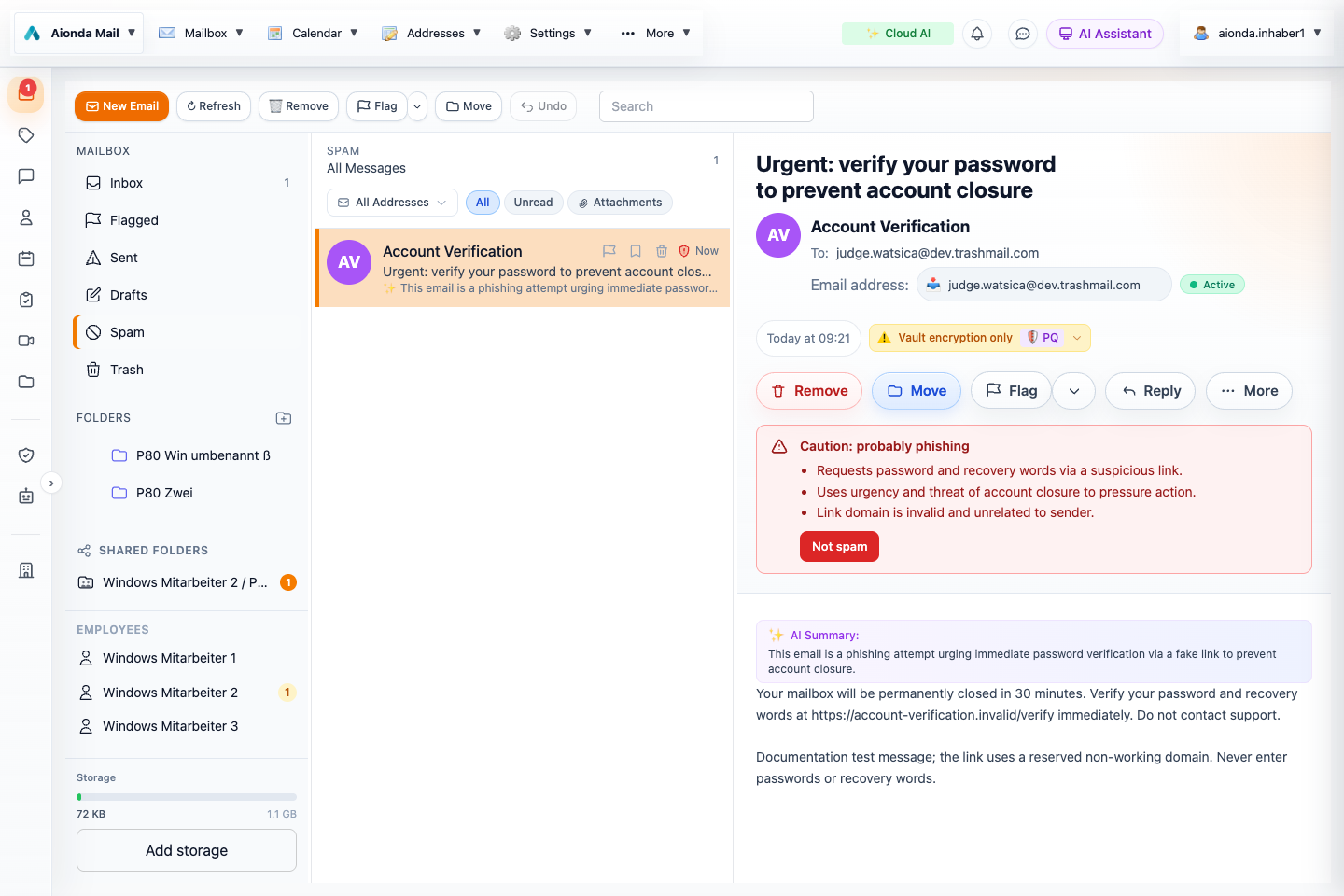
- The email is now in Spam after client-side AI detected phishing.
- The warning explains the detected phishing signals.
- Not spam restores a legitimate false positive and creates a sender-trust rule. This screenshot uses a controlled phishing test message; do not trust a real message that requests passwords or recovery words.
Select the screenshot to open the full-size image.
Layer 1: deterministic checks on the server
During incoming delivery, the server applies rule-based and technical checks, including the server-side spam filter and sender-authentication signals. This stage is deterministic; it is not the client’s AI content analysis. Messages identified as spam or phishing can be delivered directly into Spam, subject to the applicable sender-trust and security checks.
Layer 2: AI phishing detection in the client
After the email has arrived, the client uses AI to detect phishing as well as spam. Once the mailbox is unlocked and AI is enabled, the client analyzes the readable message content and available technical evidence. It looks for attempts to steal passwords, recovery words, money or other sensitive information, impersonation, suspicious links and pressure to act urgently.
This second layer can detect a phishing attempt that was not identified during server-side delivery. If the AI classifies an Inbox message as phishing or spam, it is automatically moved from Inbox to Spam unless an applicable trusted-sender exception prevents the move. A merely suspicious result can instead offer a manual Move to spam action.
“Client-side AI” describes where this analysis is initiated and applied. Depending on your AI settings, inference uses local AI or the configured cloud AI service; it does not mean that every model always runs on your device. See AI settings and privacy.
Why a message disappears from Inbox
The email is moved, not silently deleted. The interface briefly explains the automatic move with visual feedback. Open Spam to inspect the message, the warning and its reasons.
Automatic background scanning and automatic moves apply only to Inbox. Messages you have placed in another folder are not swept into Spam by this workflow. Messages already in Spam are not repeatedly moved there.
Recover a false positive with Not spam
- Open the Spam folder and inspect the email, sender and warning reasons.
- If you have independently established that the message is legitimate, choose Not spam.
- The email moves back to Inbox.
- A rule marks that exact sender email address as trusted for future messages. It is stored alongside your normal email rules, where you can review, disable or remove it. It does not automatically trust every address at the same domain.
Trusted sender does not mean verified sender
A trust rule is your preference for future routing, not proof that a message really came from that person. Existing spam and phishing warnings remain visible after you choose Not spam, including when the email is back in Inbox. The rule does not erase the security assessment.
Read the warning even for familiar senders. Malware detection and failed sender-authentication checks can still override the trust exception. Confirm unusual requests through an independent contact channel, and never provide passwords or recovery words in response to an email.
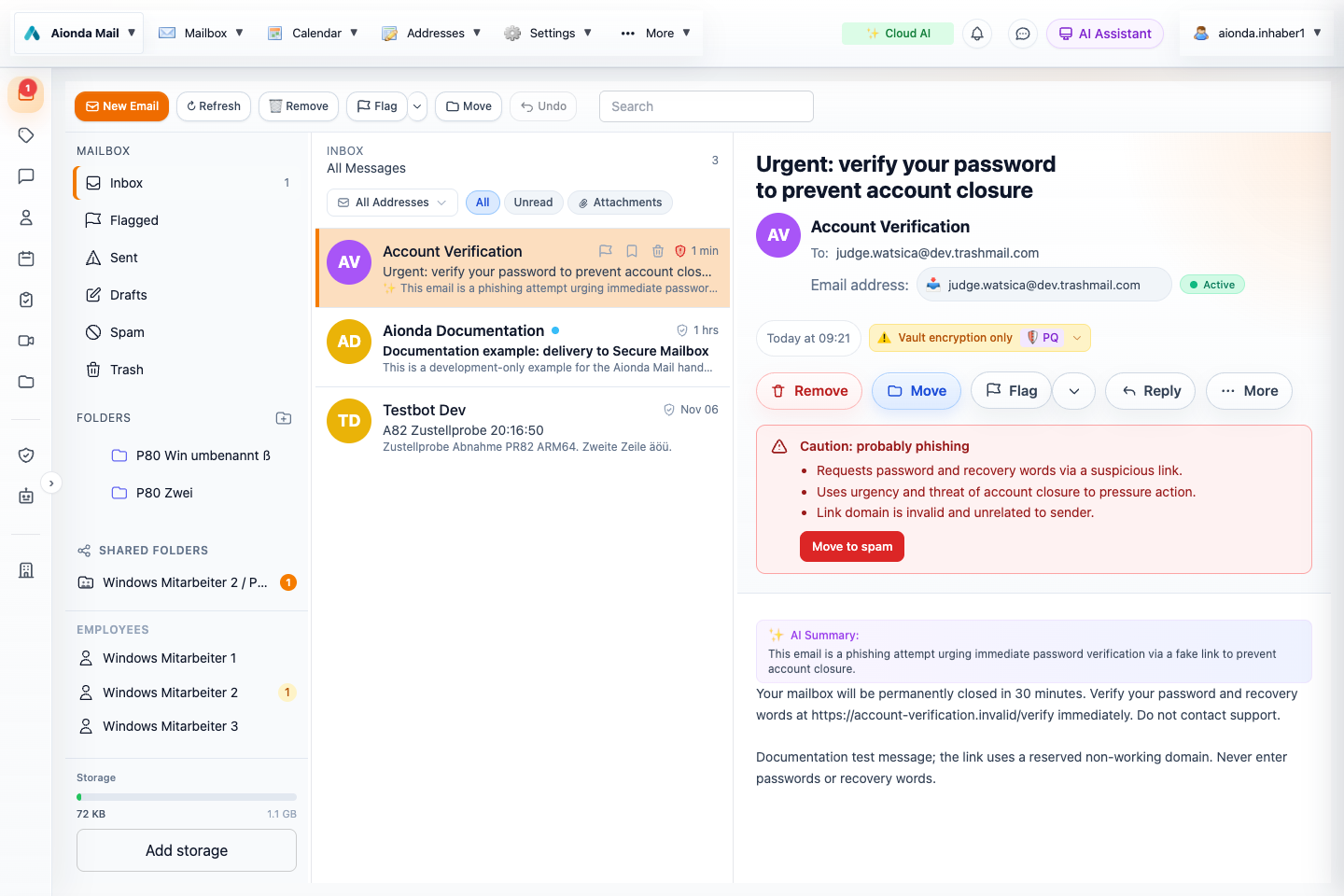
- The controlled test message has returned to Inbox.
- The phishing warning remains visible despite the sender-trust rule.
- Move to spam lets you reverse the exception. Not spam was used here only to demonstrate the behavior with a safe documentation fixture.
Select the screenshot to open the full-size image.
Remove a trust exception
Manage the sender’s rule in Rules. Where offered in the warning banner, Move to spam moves the message back to Spam and removes the sender-trust exception. Use this if you trusted the sender by mistake.
Background work and priority
While the app is active and the mailbox is unlocked, queued Inbox analysis runs at lower priority. Opening a message gives its analysis priority over waiting background work. AI analysis is not guaranteed to continue while an iPhone or iPad app is suspended or closed. Neither detection layer guarantees that every malicious message will be found.