

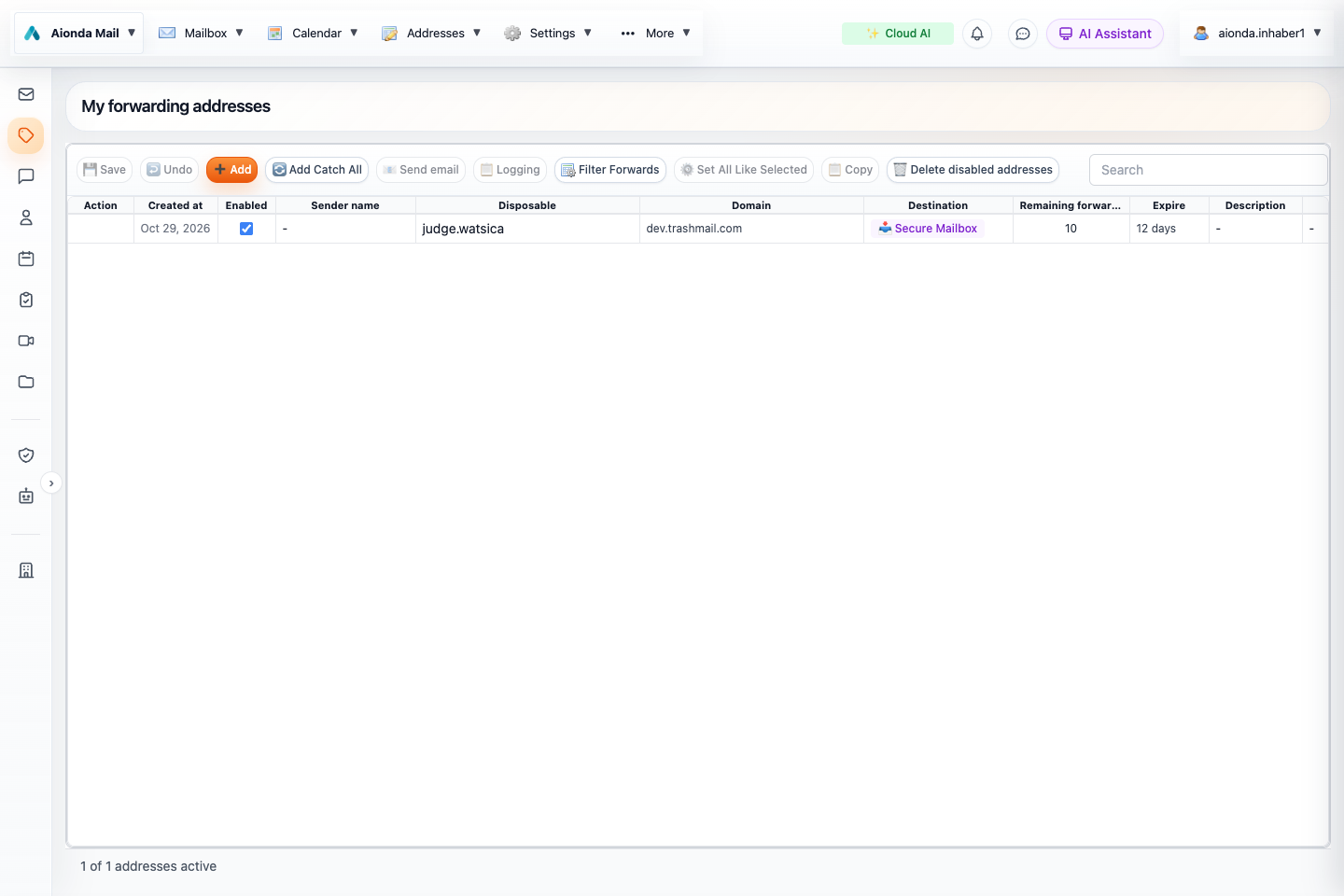
- Add an alias and save your changes.
- Select an address, then open Logging.
- Check its destination and independent forwarding and expiry limits.
Select the screenshot to open the full-size image.
DEA means disposable email address: an additional address you can manage separately from your main address. “Disposable” does not mean one use only. See the glossary and the browser add-on guide.
What is an Aionda address?
A disposable email address (DEA) is a real receiving address, such as an alias you give to a shop, a project or a mailing list. It hides your underlying destination address from the sender. You can keep it permanently or give it a limited lifetime. A separate alias for each purpose makes unwanted mail easier to trace and stop.
The address is the entrance; its Destination decides where the message goes. Receiving into the Secure Mailbox and forwarding to another provider are different choices. They can also be combined.
Create and save an address
- Open Addresses and choose Add.
- Choose the address name and an available domain. Use a description to remember what you created it for.
- Choose the destination: Secure Mailbox, a registered real email address, or the combination offered in the destination picker.
- Review Enabled, Remaining forwards and Expire. A time limit and a forwarding limit are independent.
- Choose Save. Unsaved grid changes are not a finished configuration.
- Send a harmless test message, then select the address and open Logging to verify its actual delivery path.
Where incoming mail goes
This diagram shows delivery choices, not a guarantee that every sender used end-to-end encryption. With ordinary SMTP mail, Aionda receives readable content before encrypting the stored mailbox copy. If the sender encrypted the message with your PGP public key, its protected content already arrives encrypted. A copy forwarded to another provider is subject to that provider’s storage and access rules.
Choose the right destination
| Choice | Typical use | What to check |
|---|---|---|
| Secure Mailbox only | Read and organize mail in Aionda Web, macOS or iOS. | Mailbox activated and unlock methods available. |
| External address | Keep using an existing inbox at another provider. | The destination is registered and verified; check its spam folder if delivery is accepted but the mail is missing. |
| Secure Mailbox and forwarding | Keep a mailbox copy and deliver another copy externally. | Both destinations are selected. Organizing one copy does not automatically move or delete the other. |
Add and verify a real destination through Settings → Add Real Email. A fail-over address, where configured, is a fallback for delivery problems; it is not the same as always delivering two copies.
Understand the address list
| Control or column | How to use it |
|---|---|
| Enabled | Temporarily stop the address without treating it as a permanent business identity. |
| Disposable and Domain | Together form the email address you give to others. |
| Destination | Review every recipient of incoming mail, including the Secure Mailbox. |
| Remaining forwards and Expire | Check both limits before using the address for long-term correspondence or account recovery. |
| Description and Website | Record the purpose or service associated with the alias. |
| Last Received and Forwarding errors | Identify recently used aliases and investigate delivery problems. |
| Columns, Search and Filter Forwards | Expose additional fields and narrow the list. A hidden column does not mean the setting is absent. |
Logging: follow a message from receipt to delivery
Select an address row, then choose Logging. Select a message and open Events for the sequence of processing steps. The summary distinguishes an encrypted mailbox delivery from external forwarding, queued attempts and errors. A destination server accepting a message does not prove that it placed the message in its Inbox.
Email content and Source can show retained original mail where logging and retained data are available. Send again can deliver a retained message again, or store it in the unlocked Secure Mailbox. Extend changes the log’s retention; it does not extend the alias’s lifetime. See the dedicated Logging chapter for each action, statuses and privacy implications.
Disable, extend or delete an alias
Use the Enabled control for a temporary stop, edit expiry or forwarding limits when the address should remain usable, and save the change. Deletion or expiry can prevent future password-reset and verification messages from arriving. It does not erase messages already delivered or copied elsewhere. Before deleting an alias, replace it at any services that still use it.
Catch-all addresses and your own domains
Add Catch All supports the catch-all workflow offered by your account: incoming names can be handled without creating every alias manually. Review that scope carefully because a catch-all can also attract unwanted traffic. Manage custom domains under Settings and complete the DNS setup shown there. Domain ownership alone does not route mail; the receiving records must point to the intended service.
Replying and PGP
When composing, check the From alias. Reply masking and header rewriting are forwarding options; they are not encryption. For eligible Secure-Mailbox-only aliases, Aionda manages PGP keys and publishes public keys through WKD so compatible senders can discover them. Read PGP email before relying on end-to-end protection for external correspondence.
Your standard company address
The company directory publishes one eligible DEA, not every alias or a private account address. You or the owner can choose it on the contact card. If no choice exists, the service prefers an eligible non-expiring address and otherwise uses its fallback order. Deleting or disabling the chosen address can select a replacement; if none is eligible, no usable address remains. Choose a stable non-expiring address for a published business identity.