

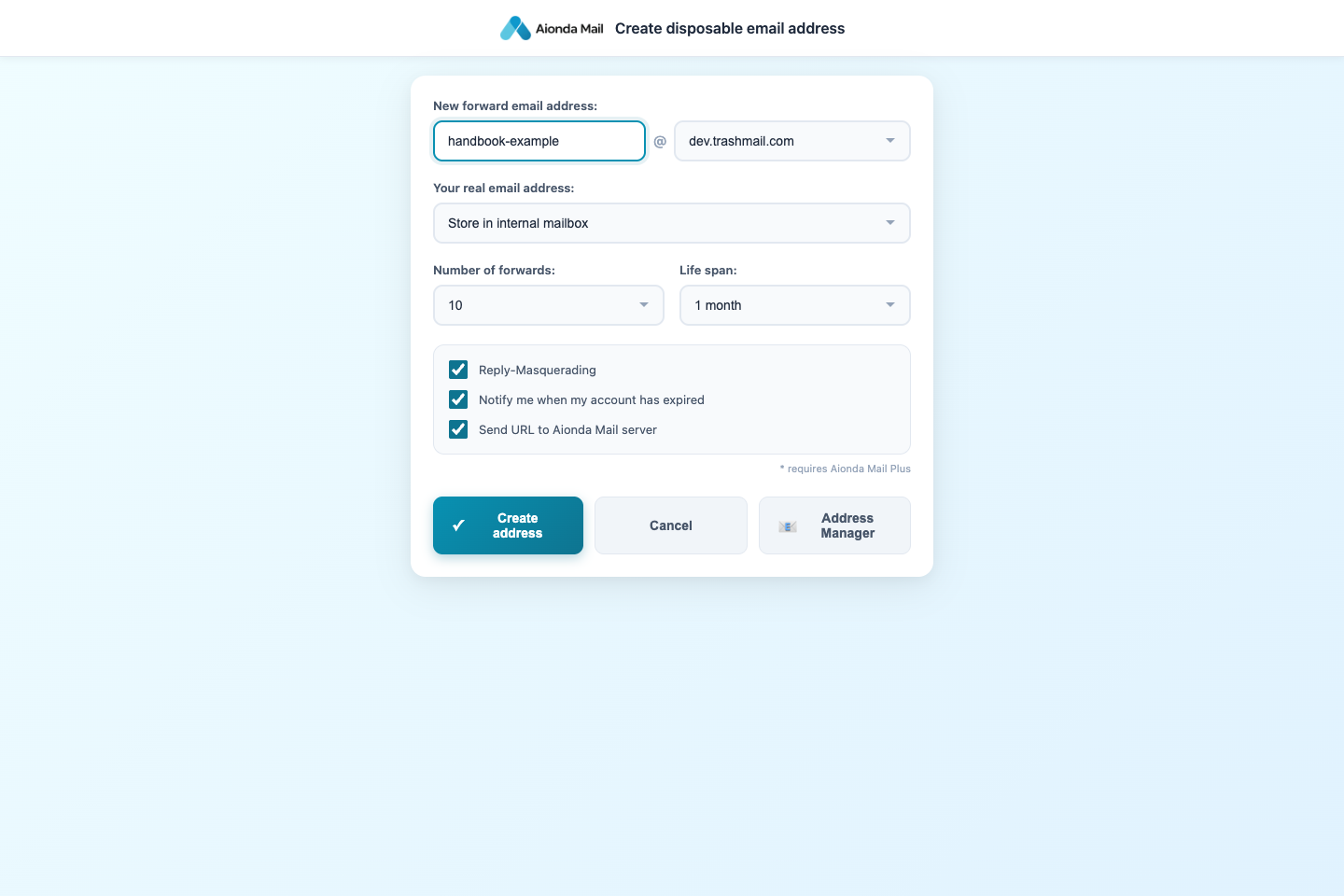
- A DEA is an additional email address: choose its name and domain.
- Choose where messages go.
- Set its limits and lifetime; “disposable” does not mean it must expire immediately.
Select the screenshot to open the full-size image.
Start with these everyday meanings. The linked chapters explain the settings and limits.
- DEA — disposable email address
An additional email address you can give to a website, shop or contact instead of your main address. DEA stands for disposable email address. In Aionda, it can deliver to your Secure Mailbox, forward to an external inbox, or use the configured combination. “Disposable” does not mean one-time only: its lifetime and limits depend on your settings and plan. Read more →
- Alias
Another address used to reach you. In this handbook, an Aionda disposable address is an individually managed alias; it is not a separate user account. Read more →
- Account
Your Aionda sign-in identity and its settings. One account can manage multiple email addresses. Your username is not necessarily the address you send from. Read more →
- Domain
The part after @ in an email address. In alex@example.invalid, example.invalid is the domain and alex is the local part. Read more →
- Forwarding
Delivering a message received at one address to another mailbox. Your external destination and Aionda Secure Mailbox are different delivery destinations. Read more →
- Secure Mailbox / Vault
The encrypted mailbox inside Aionda. “Vault” is the technical name you may see in security information. It is different from forwarding mail to another provider. Read more →
- Standard address
The address selected for a person’s company-directory contact. It is not the same as the composer’s recipient-based Automatic assignment. Read more →
- Automatic assignment
The composer’s option to select a sender address from remembered recipient associations, or propose a new address when no usable association exists. Read more →
- Composer
The editor where you choose recipients, write an email, add attachments and send or save a draft. Read more →
- To, Cc and Bcc
To identifies the main recipients. Cc sends a visible copy. Bcc sends a copy without listing that recipient for the other recipients. Read more →
- Draft
A message saved for later editing. Saving or generating a draft does not send it. Read more →
- Spam
Unwanted bulk or unsolicited email. A message can be spam without being a phishing attempt. Read more →
- Phishing
A deceptive message that tries to make you reveal secrets, pay an impostor or perform another harmful action. It can impersonate a familiar sender. Read more →
- Trusted sender
An exact sender address for which you have created a trust exception, for example with Not spam. This does not prove that a future message really comes from that person; sender addresses can be forged. Read more →
- Rule
A condition and an action used to process messages, such as moving matching mail to a folder. A sender-trust exception is also stored as a rule. Read more →
- End-to-end encryption (E2EE)
Encryption designed so that content is opened at the intended endpoints. The boundary depends on the feature: encrypted storage, PGP email, chat and a cloud-AI request are not identical situations. Ordinary incoming internet email is not automatically end-to-end encrypted. Read more →
- Passkey
A cryptographic sign-in credential used through a device or password manager, often confirmed with a fingerprint, face or device PIN. Unlocking the encrypted mailbox additionally requires compatible passkey capabilities. Read more →
- Recovery words
The secret recovery material used for your encrypted account or mailbox setup. Keep it private and follow the recovery instructions. It is not something to paste into an ordinary chat or send to support. Read more →
- PGP / OpenPGP
A standard for encrypting or signing email with keys. A signature and encryption serve different purposes; your recipient needs the appropriate key setup. Read more →
- Post-quantum encryption
Cryptographic methods designed to resist attacks by future quantum computers. This does not remove risks such as phishing or a compromised device. Read more →
- Cloud AI / Local AI / WebLLM
Cloud AI processes the supplied context on Aionda-owned infrastructure in Germany. Local AI uses a model running in your browser through WebLLM, where supported. Aionda recommends its more powerful Cloud AI. Read more →
- AI tool call
A structured request from the assistant to an application function, such as listing folders or creating a task. Some tools read data, others prepare forms or change records. Read more →
- MCP — Model Context Protocol
A connection standard that lets an external AI assistant use authorized application tools and receive their results. It is separate from Aionda’s built-in AI sidebar. Read more →
- PAT — personal access token
A secret credential for a connected application. Treat it like a password and revoke it when no longer needed. Never include it in screenshots or ordinary support messages. Read more →
- Directory / company directory
The company-managed contact list. Which colleagues and AI employees appear depends on company membership and visibility groups. It is separate from your personal contacts. Read more →
- Visibility group
A company grouping that controls which people and AI employees are visible to one another. It is not a replacement for every separate file or mailbox sharing permission. Read more →
- AI employee
An automated company assistant with its own configured task and permissions, distinct from a human employee and from your personal AI sidebar. Read more →
- Logging
A record of email delivery and processing events. Depending on the logging configuration, original message content may also be retained; logging is not the same as encrypted mailbox storage. Read more →
- Archive / hash chain
The company archive preserves records with verification information. A hash chain links records cryptographically to help detect changes. It does not by itself establish legal compliance or mean that mail is published on a public blockchain. Read more →
- Browser add-on / extension
An installed browser component that adds functions such as creating an address from a webpage. It is separate from both the web app and the native mobile/desktop apps. Read more →
- SPF — Sender Policy Framework
Checks whether a sending server is authorized for the envelope-sender domain. Missing SPF is different from a failed SPF check. Interpret the results →
- DKIM — DomainKeys Identified Mail
A domain signature over selected email content and headers. A valid signature does not mean the email is harmless. Interpret the results →
- DMARC
Checks alignment of the visible From domain with a passing SPF or DKIM result and publishes a handling policy. It does not authenticate the human display name. Interpret the results →
- TLS — Transport Layer Security
Encrypts an individual network connection. It is different from encrypting message content end to end or encrypting the stored mailbox copy. Interpret the results →
- Email headers / Authentication-Results / Received
Technical fields that describe addresses, authentication results and delivery hops. Sender-supplied text is not automatically trustworthy; missing data may leave a result unknown. Interpret the results →