

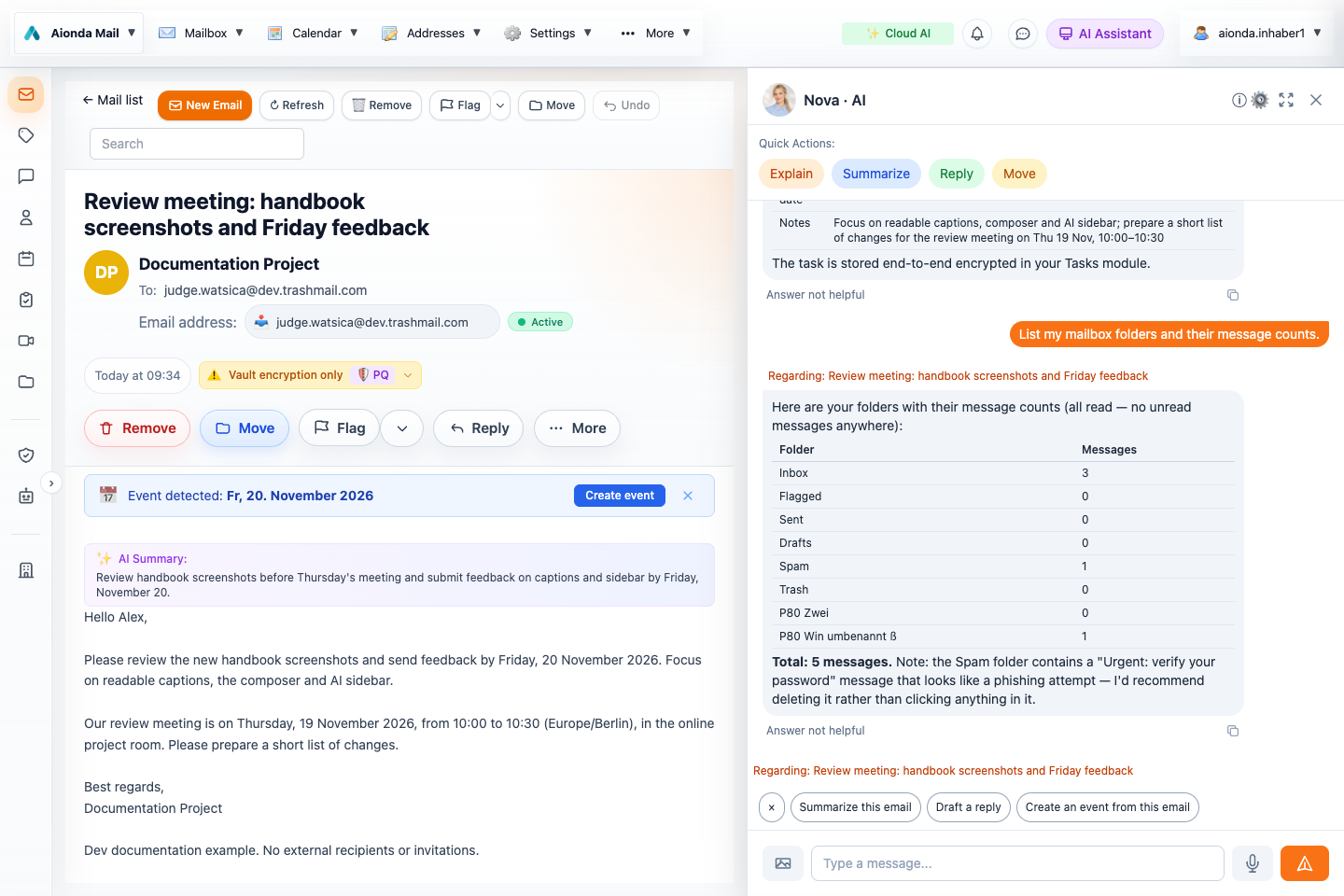
- Ask a concrete question in the AI sidebar.
- Read the result and compare it with the application. The reference below lists all current tools; this screenshot illustrates a folder-list request.
Select the screenshot to open the full-size image.
Ask in ordinary language
You do not need to type a tool name. Describe what you want; the assistant selects a tool when it needs account information or an application action. This reference names all 48 tools in the current Web assistant catalog, including enable_tools. Additional groups are activated when needed, not all sent to the model at once.
The examples below are suggested requests, not a claim that all 48 actions were executed for these screenshots. Availability depends on your account, permissions, unlocked data, selected AI mode and the feature in question. This catalog describes the in-app Web assistant, not the tool catalog of an external MCP client.
Understand the result
A prepared draft or editor is not a sent email or saved record. Check the actual application state and any confirmation dialog. Some tools immediately make reversible changes, while others ask for confirmation or leave a form open. Do not interpret a conversational suggestion as proof that an action succeeded.
Mail and drafts
| Tool and effect | Example request |
|---|---|
search_emailsFind messages by subject, sender, recipient, body or attachment terms. | “Find emails about the handbook review.” |
read_emailRead a found email’s text; long content can be truncated. | “Read the review meeting email and list its deadlines.” |
list_emailsList recent messages in a named folder. | “Show the latest messages in Inbox.” |
list_foldersList mailbox folders and message/unread counts. | “Which mailbox folders do I have?” |
reply_to_emailOpen a reply draft with recipient, subject, proposed reply and quoted original; does not send. | “Draft a polite reply confirming that I will review the screenshots.” |
compose_emailOpen a new, pre-filled email draft; does not send. | “Draft an email to my project team asking for feedback by Friday.” |
send_open_emailSend the open composer only after the confirmation dialog is accepted. | “Send the draft that is open now.” |
discard_open_emailClose and discard the open draft without sending. | “Discard this draft.” |
delete_emailMove a selected or identified email to Trash after confirmation. | “Move this test message to Trash.” |
Contacts and forms
| Tool and effect | Example request |
|---|---|
list_contactsFind address-book contacts by name, email or company. | “Find the contact for my project colleague.” |
create_contactOpen a pre-filled contact form for review; does not save it automatically. | “Prepare a contact using the details in this email.” |
save_open_formSave the open contact or rule form after an explicit follow-up instruction. Forwarding and auto-reply rules require another confirmation. | “Yes, save the contact I have just reviewed.” |
Calendar and meetings
| Tool and effect | Example request |
|---|---|
get_calendar_eventsRead calendar events in a specified date/time range. | “What is on my calendar tomorrow?” |
create_calendar_eventOpen a pre-filled event dialog for you to review and save. | “Prepare the review meeting from this email in my calendar.” |
list_video_meetingsList active meeting rooms and available room information; does not start a call. | “Show my active video meetings.” |
Tasks
| Tool and effect | Example request |
|---|---|
list_tasksList tasks using filters such as My Day, Important, Planned, Completed or a named list. | “Show my planned tasks for the review.” |
create_taskCreate a task with optional notes, due date, reminder, importance, My Day and checklist; takes effect directly. | “Create a task called Review handbook screenshots, due 20 November 2026.” |
update_taskChange a task’s fields or list; a supplied checklist replaces the previous checklist. | “Move the review task’s due date to 23 November 2026.” |
complete_taskMark an identified task completed. | “Mark Review handbook screenshots as completed.” |
reopen_taskReopen a completed task. | “Reopen Review handbook screenshots.” |
delete_taskPermanently delete an identified task after confirmation. | “Delete the test task I just created.” |
list_task_listsList task lists and counts, including smart-list counts. | “Which task lists do I have?” |
create_task_listCreate a named task list directly. | “Create a task list called Handbook review.” |
Addresses and delivery
| Tool and effect | Example request |
|---|---|
list_deasList disposable addresses, status, remaining forwards and expiry. | “Show my disposable email addresses.” |
get_dea_detailsRead the settings of one address, including destination, expiry and challenge-response. | “Show the settings of my project address.” |
create_deaCreate a disposable address directly using the supplied settings. | “Create a disposable address for project newsletters.” |
update_deaChange supported address settings after confirmation. | “Change the description of my project address.” |
set_dea_enabledEnable or disable an address after confirmation. | “Disable my old newsletter address.” |
delete_deaPermanently delete an address after confirmation. | “Delete the disposable address I no longer use.” |
diagnose_deliveryInvestigate missing delivery using accepted messages, rejected attempts, destination replies and quota findings. | “Why did the latest email to my project address not arrive?” |
get_dea_logRead logged incoming messages and delivery outcomes for one address. | “Show the delivery log for my project address.” |
get_dea_log_eventsRead the detailed event timeline for a specific logged message. | “Show the delivery events for that failed message.” |
read_logged_emailRead retained content of a logged email when available. | “Read the retained message from that log entry.” |
Rules
| Tool and effect | Example request |
|---|---|
list_rulesList current rules with conditions and actions. | “Show my email rules.” |
create_ruleOpen a pre-filled rule editor for review and saving; does not create the rule automatically. | “Prepare a rule to move mail from this newsletter sender to Spam.” |
edit_ruleOpen an existing rule for review and editing. | “Open my newsletter rule for editing.” |
toggle_ruleEnable or disable an existing rule directly. | “Disable my newsletter rule.” |
delete_rulePermanently delete an existing rule after confirmation. | “Delete my obsolete newsletter rule.” |
Drive and images
| Tool and effect | Example request |
|---|---|
list_drive_filesList or search own Drive files, optionally in a named folder. | “Find handbook files in my Drive.” |
read_drive_fileRead supported text files from your own Drive; current limits apply. | “Read review-notes.txt from my Drive and summarize it.” |
analyze_imageAnalyze a supported image in your own Drive using vision AI. | “Describe the screenshot review.png in my Drive.” |
Web and domain checks
| Tool and effect | Example request |
|---|---|
web_searchSearch the web and return titles, links and snippets. | “Search for the official documentation for DMARC.” |
fetch_urlRetrieve the readable text of a public HTTP/HTTPS page. | “Read the official page from the search results.” |
dns_lookupLook up DNS record types such as A, AAAA, MX, TXT, CNAME, NS, PTR, SOA and CAA. | “Look up the MX records for my domain.” |
check_mail_domainCheck domain mail configuration, including MX, SPF, DMARC, DKIM, MTA-STS and blocklist findings. | “Check the email configuration of my domain.” |
Help and tool availability
| Tool and effect | Example request |
|---|---|
read_helpRead a topic from the built-in product help. | “How do I import emails from my previous provider?” |
contact_supportPrepare a support email containing your message and the AI conversation transcript; you review and send it. | “Prepare a support request about this problem.” |
enable_toolsActivate an additional tool group for the current AI conversation. The assistant handles this when needed; it grants no new account permissions. | “Use the task tools to help organize my review.” |
Boundaries to keep in mind
- Mailbox search and reads return bounded results or excerpts. Ask for a narrower search or another message when details are missing; a short result is not proof that no other mail exists.
- Drive text reading currently handles supported text files from your own Drive, with a 1 MB file-size limit and up to 8,000 characters returned. It is not a general reader for every PDF, office document or shared file.
- Image analysis and attachment analysis are distinct from plain text file reading. Check the actual supported input.
- Web search, page retrieval and DNS checks make external requests. Do not include confidential email content or secrets in a public search query.
- Rules apply to new incoming mail; preparing a rule is not a bulk operation on existing messages.
- contact_support prepares an email with the conversation transcript. Review and remove sensitive content before sending it.
- enable_tools activates a tool group within the conversation; it does not grant extra account permissions.
For illustrated workflows, see the AI sidebar and the composer and its AI writing tools.