

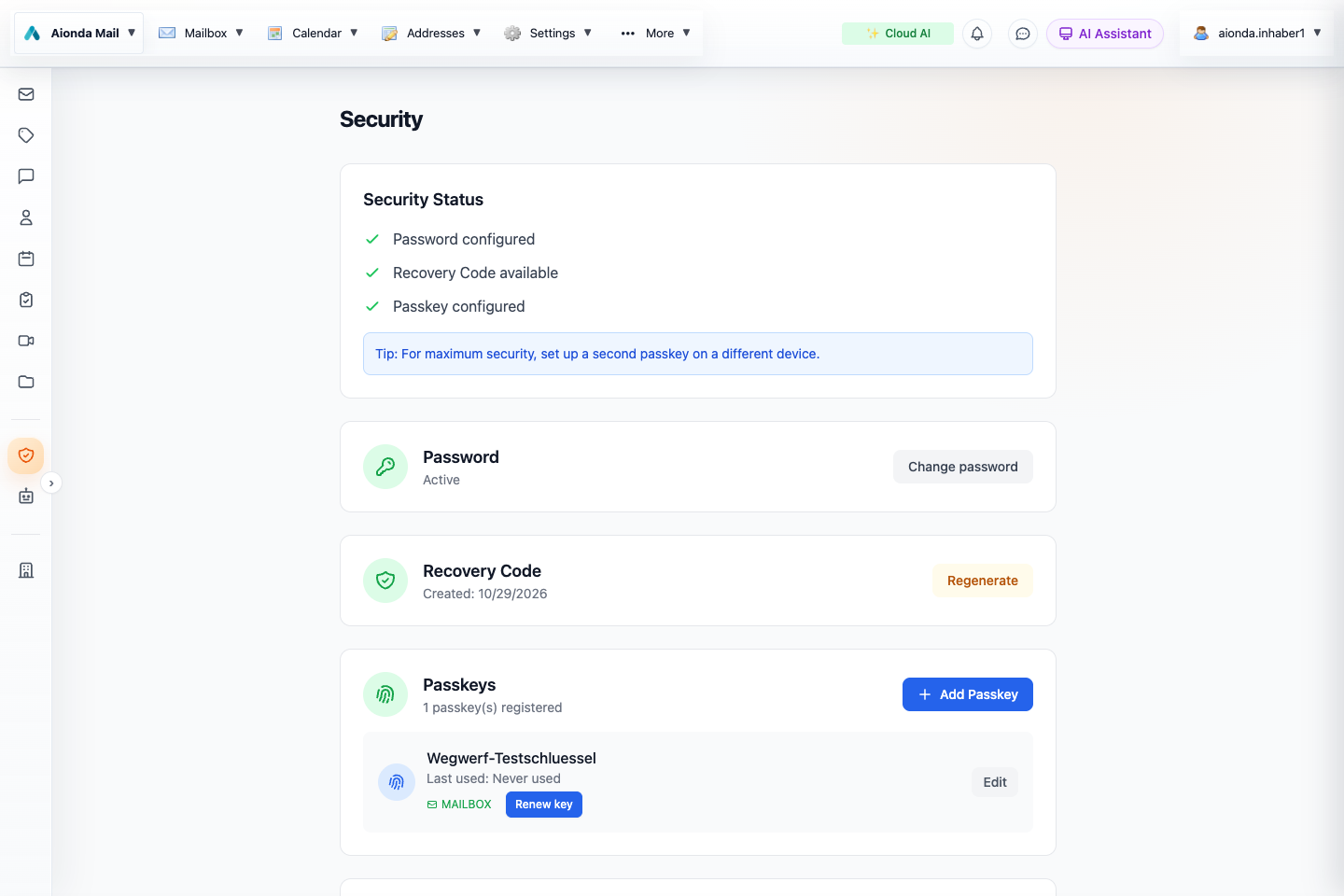
- Review the configured password, recovery and passkey methods.
- Check the passkey’s mailbox capability and manage your authenticators.
Select the screenshot to open the full-size image.
Start with three different questions
Who may sign in? Authentication checks access to the account. Who can unlock stored content? Encryption keys protect the mailbox and workspace. Was the message protected before it reached Aionda? That depends on the sender and the delivery route. A secure account does not make every ordinary Internet email end-to-end encrypted.
Public and private keys, in plain language
A public key lets someone prepare an encrypted message for you. Your corresponding private key opens it. Publishing the public key is expected; protecting the private key is essential. Aionda encrypts private mailbox key material under a master key that is reconstructed on your device when you unlock the mailbox.
How a passkey helps
A passkey is a cryptographic sign-in credential approved through your device or authenticator, often with a fingerprint, face recognition or a device PIN. You do not type a reusable password into the site for the passkey operation. Whether a passkey can also unlock the mailbox depends on support for the required WebAuthn PRF capability.
PRF supplies key-derived material for protecting one part of the vault unlock secret. A passkey that works for sign-in is therefore not automatically sufficient for mailbox unlocking. Review its mailbox status in Security. Biometrics approve the local authenticator operation; Aionda does not need a copy of your fingerprint or face.
Two out of three unlock factors
The vault master key uses a two-of-three sharing scheme. One share is protected through your password, one through a compatible passkey and one through your recovery information. Two different available shares reconstruct the key; this is not the same as merely having two passkeys.
| Available factors | Typical purpose |
|---|---|
| Password + compatible passkey | Normal vault unlock. |
| Password + recovery information | Recover access when a passkey is unavailable. |
| Compatible passkey + recovery information | Recover or change access when the password is unavailable, through the supported recovery flow. |
Keep recovery words offline and never send them to support. Confirm another usable recovery path before removing a credential. A device’s ability to sign in is not proof that it can reconstruct the mailbox keys.
What “post-quantum” protects
An attacker could collect encrypted traffic today and try to decrypt it later with a powerful quantum computer. Aionda’s mailbox key encapsulation combines X25519, a classical method, with ML-KEM-1024, a post-quantum method. Message content is protected with AES-256-GCM. In everyday terms, the hybrid construction protects the key needed to open the encrypted mailbox copy.
This protection is about the implemented encryption path. It does not make a compromised device safe, hide all delivery metadata, or automatically upgrade an external provider, a traditional PGP key or the sender’s original connection. The PQ indicator describes the mailbox protection; inspect the other security information to understand the whole route.
Read the security indicators
| Protection | What it tells you |
|---|---|
| TLS transport | A connection between systems was encrypted. The participating mail servers can still process ordinary mail. |
| Vault / PQ encryption | The stored mailbox copy uses Aionda’s encrypted mailbox scheme. This alone does not say that the sender encrypted the original. |
| PGP encryption | The sender encrypted protected message content for the recipient before delivery. See the PGP chapter. |
| Signature | A signature can support authenticity and integrity relative to a trusted key. Signing is different from keeping content confidential. |
The boundaries of end-to-end protection
Drive uploads and supported encrypted workspace records are encrypted on the client. Ordinary external SMTP mail can arrive readable and is then encrypted for mailbox storage. For external end-to-end email, use a compatible content-encryption mechanism such as PGP at the sender and recipient.
Explicit shares give recipients access to the selected data. Enterprise key deposit can authorize organizational access. Cloud AI receives the readable context sent for processing, and an external MCP assistant receives its tool results. Optional email logging can retain a separate original message. Review these boundaries instead of interpreting “encrypted mailbox” as “no other copy or authorized reader exists”.
Keep access recoverable
- Open Security and review password, recovery and passkey status.
- Add a compatible second authenticator when appropriate and verify that the required unlock workflow works.
- Keep recovery information securely offline, separate from the device.
- Inspect key-renewal prompts and their sharing implications before proceeding.
- Lock or sign out on shared devices. Report unexpected key changes through a separate trusted channel.
Background standards
For the underlying standards, see NIST FIPS 203: ML-KEM and the W3C Web Authentication specification. These describe cryptographic and authentication building blocks; the product-specific boundaries above explain how they apply to Aionda Mail.
Understand sender checks and transport security
Encryption protects content; authentication checks the use of a sender domain. Neither guarantees that a message is honest. The mailbox’s security badge opens the encryption diagram. SPF, DKIM and DMARC are separate mail-authentication concepts, not extra arrows in that diagram.
| Check | What it means | If missing or failing |
|---|---|---|
| SPF Sender Policy Framework | Checks whether the sending server’s IP is authorized by the envelope-sender domain (or HELO identity). This is not necessarily the address displayed in From. | None / no SPF: no applicable policy/result was available; this is not the same as fail. Fail: the server is not authorized by that policy. Forwarding and configuration problems can also cause failure. Softfail and neutral are less definitive outcomes. |
| DKIM DomainKeys Identified Mail | A domain signs selected headers and message content. A valid signature supports the integrity of the signed material and the signing domain’s responsibility. | None: there is no signature to validate. Fail: the signature could not be validated, for example after content changes or because of a key/configuration problem. A pass does not identify the human author or prove that the content is safe. |
| DMARC Domain-based Message Authentication, Reporting, and Conformance | Relates the visible From domain to a passing, aligned SPF or DKIM result. The domain can publish a handling preference: none, quarantine or reject. | Missing: no usable DMARC policy/result. Fail: the required aligned authentication was not established. Receivers consider their own policies too. A pass does not protect against a lookalike domain, deceptive display name or compromised sender account. |
| TLS Transport Layer Security | Encrypts a connection between systems. SMTP delivery can involve several separate connections; ordinary participating mail servers still process the message. | No TLS on a delivery hop: content may have crossed that hop without transport encryption, exposing it to interception there. It does not prove that interception happened. Unknown: insufficient evidence; absence of evidence is not proof that TLS was absent. |
Standards: SPF (RFC 7208), DKIM (RFC 6376), DMARC (RFC 9989) and SMTP over TLS (RFC 3207).
What should I do with a warning?
- A familiar sender with missing SPF: do not automatically call it phishing. Check the full address, the request and the other available results.
- A payment request with authentication failures: verify it using a known phone number or a separate trusted channel. Do not use contact details supplied only by the suspicious message.
- No TLS: mailbox encryption still protects the stored copy, but cannot retroactively protect the earlier delivery hop. Use sender-to-recipient content encryption such as PGP when required.
- Everything passes but the request looks wrong: remain cautious. Attackers can authenticate their own domains; a real account can be compromised. AI phishing detection analyzes different signals and can still warn.
Authentication-Results and Received are technical email headers that can record checks and delivery hops. Only results added by a trusted receiving system should be relied on; arbitrary sender-supplied header text is not proof. If you need help interpreting a particular message, use the available delivery/security information and ask support rather than changing your domain’s DNS at random.