

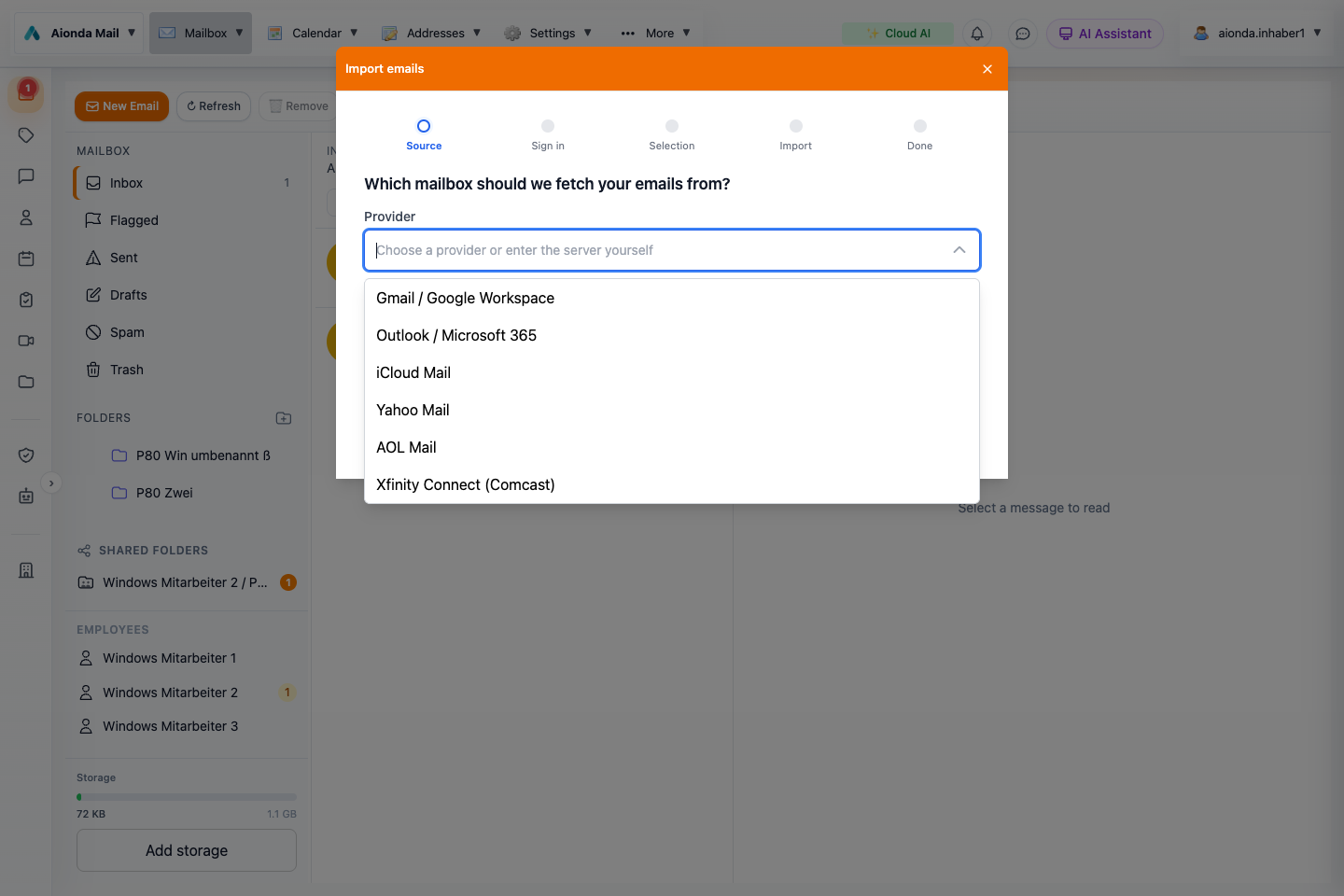
- Follow Source, Sign in, Selection, Import and Done.
- Search or choose a provider. The menu shown here is the English provider selection; other languages show regional presets.
Select the screenshot to open the full-size image.
Import mail from another account
Open Mailbox → Import emails. Choose the source provider, sign in, select the folders or messages offered by the wizard, and follow the import progress. Keep access to your original mailbox until you have checked the imported folders, messages and attachments.
Supported provider presets
The following providers are configured in the Web import catalog. The visible dropdown varies with the interface language; a provider absent from your regional list can be entered through Other provider (IMAP) using its current server settings. Googlemail is also recognized as a Gmail alias. A preset does not override the source provider’s account restrictions, administrator policies or current service availability.
| Source system | Preparation or sign-in |
|---|---|
| AOL Mail | Use an app password. |
| Arsys | Use the mailbox credentials and settings supplied by the provider. |
| AT&T Mail | Use an app password. |
| Bbox Mail (Bouygues Telecom) | Use the mailbox credentials and settings supplied by the provider. |
| BOL Mail | Use the mailbox credentials and settings supplied by the provider. |
| BT Email | Use the mailbox credentials and settings supplied by the provider. |
| Correo Movistar | Use the separate email password. |
| Cox Email | Use an app password. |
| DreamHost | Use the mailbox credentials and settings supplied by the provider. |
| EarthLink | Use the mailbox credentials and settings supplied by the provider. |
| Fastmail | Use an app password. |
| Free | Use the mailbox credentials and settings supplied by the provider. |
| freenet | Enable IMAP or third-party access with the provider. |
| Gandi Mail | Use the mailbox credentials and settings supplied by the provider. |
| Gmail / Google Workspace | Use an app password. |
| GMX | Enable IMAP or third-party access with the provider. |
| GMX.com | Enable IMAP or third-party access with the provider. |
| GMX.es | Enable IMAP or third-party access with the provider. |
| GMX.fr | Enable IMAP or third-party access with the provider. |
| GoDaddy Professional Email | Use the mailbox credentials and settings supplied by the provider. |
| Hostinger Email | Use the mailbox credentials and settings supplied by the provider. |
| iCloud Mail | Use an app password. |
| iG Mail | Enable IMAP or third-party access with the provider. |
| IONOS | Use the mailbox credentials and settings supplied by the provider. |
| IONOS / 1&1 | Use the mailbox credentials and settings supplied by the provider. |
| IONOS España | Use the mailbox credentials and settings supplied by the provider. |
| IONOS France | Use the mailbox credentials and settings supplied by the provider. |
| KingHost | Use the mailbox credentials and settings supplied by the provider. |
| laposte.net | Use the mailbox credentials and settings supplied by the provider. |
| Locaweb | Use the mailbox credentials and settings supplied by the provider. |
| Mail Orange | Enable IMAP or third-party access with the provider. |
| mail.com | Enable IMAP or third-party access with the provider. The preset requires a paid mailbox plan. |
| mailbox.org | Use the mailbox credentials and settings supplied by the provider. |
| Mailo | Use the mailbox credentials and settings supplied by the provider. |
| Namecheap Private Email | Use the mailbox credentials and settings supplied by the provider. |
| Outlook / Microsoft 365 | Authorize access with Microsoft sign-in (Microsoft Graph). |
| OVHcloud MX Plan | Use the mailbox credentials and settings supplied by the provider. |
| Portugalmail | Use the mailbox credentials and settings supplied by the provider. |
| Posteo | Use the mailbox credentials and settings supplied by the provider. |
| R7 Mail | Use the mailbox credentials and settings supplied by the provider. |
| SAPO Mail | Use the mailbox credentials and settings supplied by the provider. The preset requires a paid mailbox plan. |
| SFR Mail | Use the mailbox credentials and settings supplied by the provider. |
| Sky Yahoo Mail | Use an app password. |
| Spectrum Email | Use the mailbox credentials and settings supplied by the provider. |
| STRATO | Use the mailbox credentials and settings supplied by the provider. |
| T-Online | Use the separate email password. |
| Terra Mail | Use the mailbox credentials and settings supplied by the provider. |
| UOL Host | Use the mailbox credentials and settings supplied by the provider. |
| UOL Mail | Use the mailbox credentials and settings supplied by the provider. |
| Vodafone / Arcor | Use the mailbox credentials and settings supplied by the provider. |
| WEB.DE | Enable IMAP or third-party access with the provider. |
| Xfinity Connect (Comcast) | Enable IMAP or third-party access with the provider. |
| Yahoo Mail | Use an app password. |
| Zoho Mail | Enable IMAP or third-party access with the provider. |
Microsoft, Google and Apple accounts
Outlook.com, Hotmail and Microsoft 365 use Microsoft authorization. Work or school tenants may require administrator approval. Gmail / Google Workspace and iCloud use their guided account setup; app passwords must be available for the source account. Follow the instructions displayed by the wizard.
Other providers and company servers
Choose Other provider (IMAP) for an IMAP-enabled mailbox, including a company server or self-hosted system. Enter the server hostname, port, secure connection settings and mailbox credentials. The importer supports TLS on port 993 or STARTTLS on port 143. Ask your administrator if IMAP access is disabled. A self-hosted Exchange mailbox needs an enabled compatible IMAP service; Microsoft cloud accounts should use Microsoft sign-in.
Thunderbird and Apple Mail are applications rather than source mail servers: import from the account they connect to. The current Web mail-import wizard does not offer direct PST, OST or MBOX file upload. EML download is an export feature, not a promise that EML files can be uploaded through this wizard.
Contacts, calendars and address lists
- Contacts: import vCard (.vcf or .vcard) or supported CSV files from the Contacts workspace. Check field mapping and duplicates with a small sample first.
- Calendar: import an iCalendar file (.ics; the picker also accepts .ical, .ifb and .icalendar). Verify the imported events and target calendar.
- Disposable addresses: use the address CSV import with the compatible Aionda export structure. This imports address records, not email messages.
Export and portability
Use the relevant workspace’s export or download action. Check the resulting file format and open it in an appropriate reader. A PDF is useful for reading but is not automatically a complete machine-readable export with attachments and metadata. An archive forensic export is evidence about integrity, not necessarily a full mailbox backup.
Browser extension
The browser extension can help create and insert disposable addresses in forms. Use the installed extension’s account settings and review the chosen lifetime before submitting a form. An alias that expires too soon can prevent later password-reset messages from reaching you.
Before changing systems
Check address continuity, exported content, folder structure and recovery methods on the new device. Keep access to the old environment until you have confirmed that important records and authentication methods work in the new one.